
Note
Go to the end to download the full example code.
Spherical Harmonics Order Visualization#
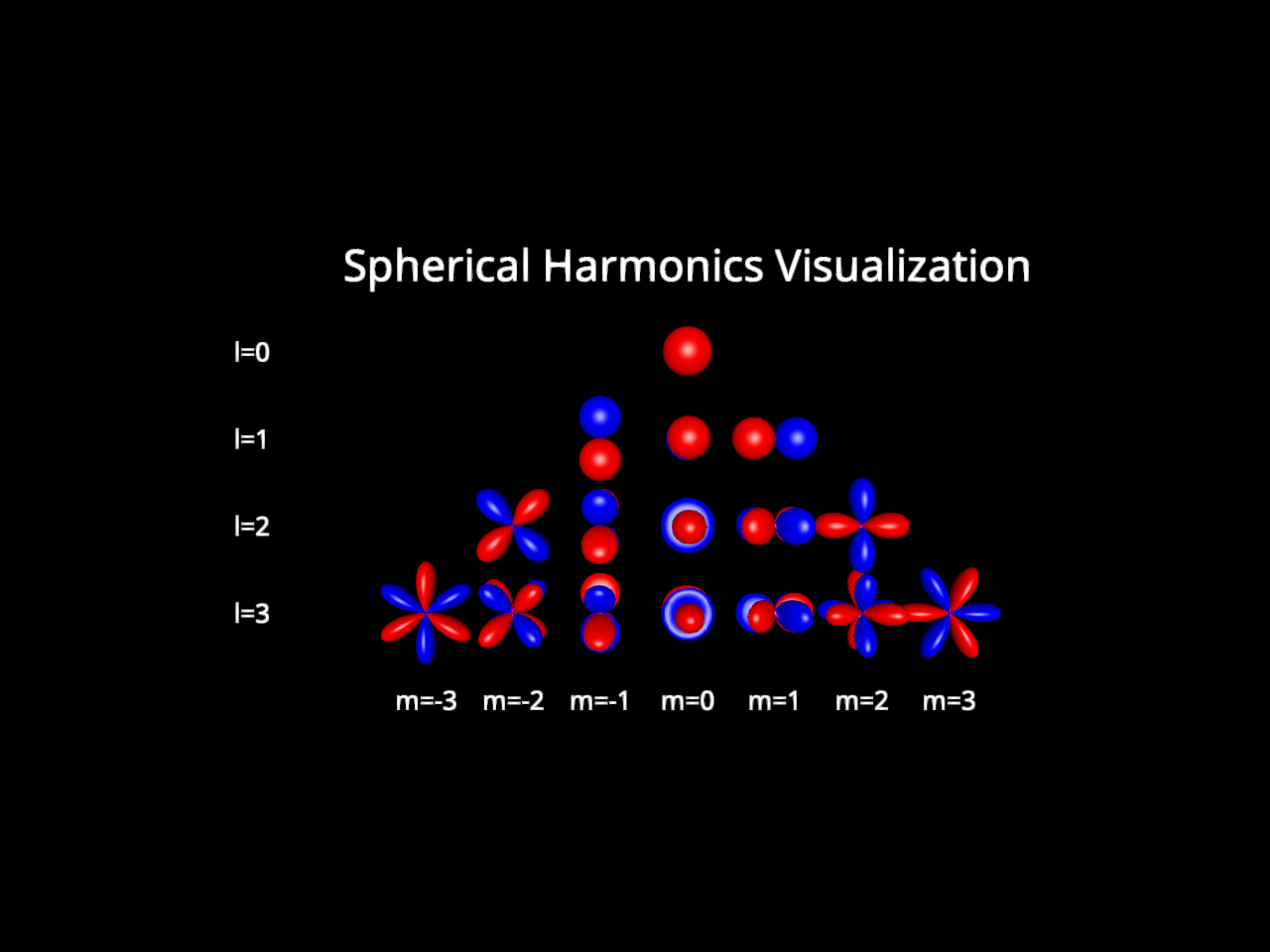
This example demonstrates how to use the sph_glyph actor to visualize spherical harmonics. The sph_glyph actor is used to visualize the spherical harmonics coefficients as glyphs on the surface of a sphere.
import numpy as np
from fury import actor, window
We will create a set of spherical harmonics coefficients to visualize the degree and order of the spherical harmonics. We will explore till degree 3 and order 3.
coefficients = np.zeros((7, 4, 1, 16), dtype=np.float32)

# Order 0
coefficients[3, 3, 0, 0] = 1.0

#  Order 1
coefficients[2, 2, 0, 1] = 1.0
coefficients[3, 2, 0, 2] = 1.0
coefficients[4, 2, 0, 3] = 1.0

# Order 2
coefficients[1, 1, 0, 4] = 1.0
coefficients[2, 1, 0, 5] = 1.0
coefficients[3, 1, 0, 6] = 1.0
coefficients[4, 1, 0, 7] = 1.0
coefficients[5, 1, 0, 8] = 1.0

# Order 3
coefficients[0, 0, 0, 9] = 1.0
coefficients[1, 0, 0, 10] = 1.0
coefficients[2, 0, 0, 11] = 1.0
coefficients[3, 0, 0, 12] = 1.0
coefficients[4, 0, 0, 13] = 1.0
coefficients[5, 0, 0, 14] = 1.0
coefficients[6, 0, 0, 15] = 1.0
Now we can create a spherical glyph actor to visualize these coefficients. Set sphere=(latitude_segments, longitude_segments) to change glyph resolution.
sph_glyph = actor.sph_glyph(coefficients, sphere=(50, 50))
Let’s create text actors to label the degree and order of the spherical harmonics.
main_text = actor.text(
    "Spherical Harmonics Visualization",
    position=(3, 4, 0),
    font_size=0.5,
)

order_0_text = actor.text("l=0", position=(-2, 3, 0), font_size=0.3)
order_1_text = actor.text("l=1", position=(-2, 2, 0), font_size=0.3)
order_2_text = actor.text("l=2", position=(-2, 1, 0), font_size=0.3)
order_3_text = actor.text("l=3", position=(-2, 0, 0), font_size=0.3)

degree_0_text = actor.text("m=0", position=(3, -1, 0), font_size=0.3)
degree_1_text = actor.text("m=1", position=(4, -1, 0), font_size=0.3)
degree_2_text = actor.text("m=2", position=(5, -1, 0), font_size=0.3)
degree_3_text = actor.text("m=3", position=(6, -1, 0), font_size=0.3)
degree_neg_1_text = actor.text("m=-1", position=(2, -1, 0), font_size=0.3)
degree_neg_2_text = actor.text("m=-2", position=(1, -1, 0), font_size=0.3)
degree_neg_3_text = actor.text("m=-3", position=(0, -1, 0), font_size=0.3)
Finally, we can create a window to display the spherical glyph and the text actors.
scene = window.Scene()
scene.add(
    sph_glyph,
    main_text,
    order_0_text,
    order_1_text,
    order_2_text,
    order_3_text,
    degree_0_text,
    degree_1_text,
    degree_2_text,
    degree_3_text,
    degree_neg_1_text,
    degree_neg_2_text,
    degree_neg_3_text,
)

show_m = window.ShowManager(
    scene=scene, size=(800, 600), title="FURY Spherical Harmonics Visualization"
)

show_m.start()
Total running time of the script: (0 minutes 0.601 seconds)