
Note
Go to the end to download the full example code.
Keyframe animation: Camera and opacity#
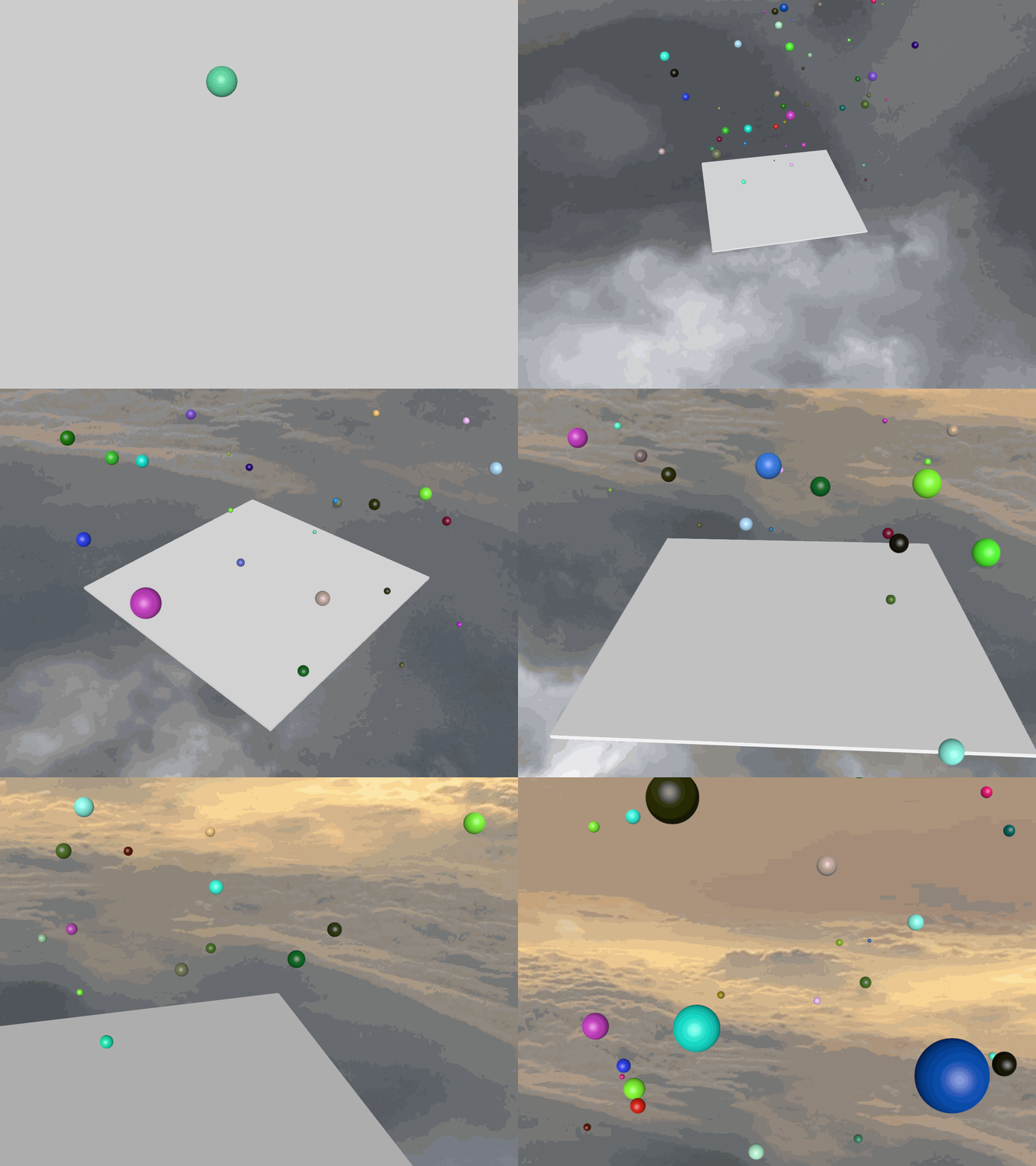
Camera and opacity keyframe animation explained in this tutorial.
import numpy as np

import fury
from fury.motion import Animation, CameraAnimation, Timeline, cubic_spline_interpolator
from fury.data import fetch_viz_cubemaps, read_viz_cubemap
from fury.io import load_cube_map_texture
The Plan#
The plan here is to animate, scale, and translate 50 spheres randomly, then
show FURY text at the end.
Let’s fetch and load a skybox texture.
fetch_viz_cubemaps()
texture_files = read_viz_cubemap("skybox")
cube_map = load_cube_map_texture(texture_files)

scene = fury.window.Scene(skybox=cube_map)

showm = fury.window.ShowManager(
    scene=scene,
    size=(900, 768),
    pixel_ratio=2,
)
Dataset is already in place. If you want to fetch it again please first remove the folder /Users/maharshigor/.fury/cubemaps
Creating the main Timeline#
Here we create a Timeline so that it can control all animations from one
place. A playback panel is attached to provide interactive playback controls.
Creating an actor for visualization.
plane = fury.actor.box(
    np.array([[0, 0, 0]]),
    colors=np.array([[1, 1, 1]]),
    scales=np.array([[20, 0.2, 20]]),
)
Creating FURY text#
fury_text = fury.actor.text(
    text="FURY", position=(0, 15, 0), font_size=5, anchor="middle-center"
)
Creating an Animation to animate the opacity of fury_text.
text_anim = Animation(actors=fury_text, loop=False)
Opacity is set to 0 at time 29 and to 1 at time 35. Linear interpolation is used by default.
text_anim.set_opacity(29, 0.0)
text_anim.set_opacity(35, 1.0)
timeline.add_animation(text_anim)
Creating and animating 50 spheres#
for _ in range(50):
    ###########################################################################
    # Create a sphere actor centered at the origin with random color and radius.
    sphere_actor = fury.actor.sphere(
        np.array([[0, 0, 0]]),
        colors=np.random.random([1, 3]),
        radii=np.random.random(1) * 0.5 + 0.1,
    )

    ###########################################################################
    # Create one animation for this sphere.
    animation = Animation(actors=sphere_actor)

    ###########################################################################
    # Generate random position and scale values every two seconds.
    for t in range(0, 50, 2):
        animation.set_position(t, np.random.random(3) * 30 - np.array([15, 0, 15]))
        animation.set_scale(t, np.repeat(np.random.random(1), 3))

    ###########################################################################
    # Change the position interpolator to cubic spline interpolation.
    animation.set_position_interpolator(cubic_spline_interpolator)
    timeline.add_animation(animation)
Animating the camera#
Camera animations are represented with CameraAnimation. Three properties
can control the camera: position, focal position, and view-up direction.
camera_anim = CameraAnimation(loop=False)
timeline.add_animation(camera_anim)

camera_positions = {
    0: np.array([3, 3, 3]),
    4: np.array([50, 25, -40]),
    7: np.array([-50, 50, -40]),
    10: np.array([-25, 25, 20]),
    14: np.array([0, 16, 25]),
    20: np.array([0, 14.5, 20]),
}

camera_focal_positions = {
    15: np.array([0, 0, 0]),
    20: np.array([3, 9, 5]),
    23: np.array([7, 5, 3]),
    25: np.array([-2, 9, -6]),
    27: np.array([0, 16, 0]),
    31: np.array([0, 14.5, 0]),
}

camera_anim.set_position_keyframes(camera_positions)
camera_anim.set_focal_keyframes(camera_focal_positions)
Change camera position and focal interpolators.
camera_anim.set_position_interpolator(cubic_spline_interpolator)
camera_anim.set_focal_interpolator(cubic_spline_interpolator)
Add non-animated actors to the scene.
scene.add(plane)
Add the timeline to the ShowManager for interactive playback.
showm.add_animation(timeline)
Recording the animation#
record_animation = False

if record_animation:
    timeline.record("viz_fury_animation.mp4", fps=30)
else:
    ###########################################################################
    # The ShowManager must go on!

    showm.start()
Total running time of the script: (0 minutes 22.605 seconds)